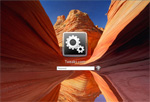
When I first started to customize logon screens in Windows using a resource hacker to replace bitmaps in logon screen DLL files was the only way. This would get the job done but it would also break digital signatures on the system files, something that Microsoft values more and more with each OS release. For the first time in Windows with the Windows 7 release, Microsoft is providing the ability to customize the logon screen background without hacking any system files.
Using a feature that was originally designed for OEM computer manufactures like Dell and others to brand their computers, everyone can now safely customize their Windows 7 logon screen background.
The actual process requires creating some registry keys, folders and files. To simplify the process I created a free utility called the Tweaks.com Logon Changer that will allow you change the logon screen background with just a few clicks.
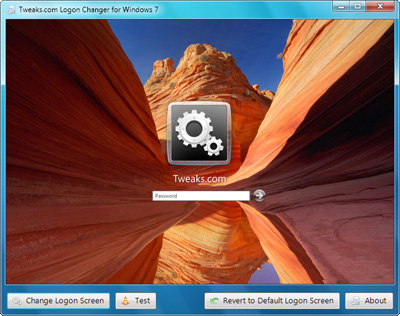
After you download and start the utility just click Change Logon Screen and then select your new background.

The new background will be active as soon as you select the new background. Click Test to see it in action.
Make sure that the background you select is smaller than 256KB, otherwise it will be rejected because of a size limitation set by Microsoft.
If you want to remove your customized background just click Revert to Default Logon Screen and the registry changes will be removed.
Click here to visit the Tweaks.com Logon Changer Web page and download for free.
If you would like to manually tweak your logon screen by editing the registry and copying files visit Rafael's tutorial here.



Thx for the app.
In any case thanks so much for this app
Second, I want to post a suggestion:
Why not have the least selected folder instead of the defaulty My Pictures folder in the open dialog?
Any Ideas?
Do you know what resolution the image needs to be? Presumably Windows scales it but what is an ideal shape/size to start with?
TweaksLogon.exe - Fatal error CLR error: 80004005. The program will now terminate.
and then it shuts down the app and I cant use it again. I tried redownloading but that didnt work either. Wish I could use it more than once =/ it was nice to have the option while it lasted.
Thank you for Change Logon Screen
However, when using WindowBlinds by Stardock, I can't use TweakLogon, because the buttons on the bottom of the window aren't there. The work-around is to switch back, in WindowBlinds, to the standard Aero theme temporarily and then run TweakLogon to change the logon screen.
This would not be all that frustrating, except that if you ever change the theme under "Personalize", it changes the logon screen back to the default, thus requiring going through the work-around to get the logon screen changed back to what I want it to be.
I'm running an Acer w/Win7 Premium and was disappointed it didn't work at first, but then I read your comment about the "C:\Windows\System32\oobe\info\backgrounds" folder. I went there and saw my new image and took all the yucky stock images and moved them to another folder, restarted my computer, and PRESTO! Thanks for the tip!
Now if only I could figure out how to bundle this application, or something similar, into the "personalized themes" section in Control Panel.
Thanks
one1
Thanks!!
Eviltwin
i have an acer aspire 5532? (if that's what it's called!) and it has its own custom logon screen. if i choose 'Default Login Screen' that works fine and goes to the windows 7 design, however when i choose my own picture to use, i test it and the 'acer' logon screen pops up instead.
any help would be greatly appreciated
cheers
thanks for any help
I have always wondered how to do this inorder to brand the office computers,
Would this work on multiple operating systems... not all the computers are running 7,
Keep up the good work
cheers
Thanks, Ross. Worked beautifully.
Im logged in as the local administrator and have tried using the tool in "run as administrator" mode?
Whether I use the utility or I manually change the logon background,
it will revert to default every time I change the background themes.
Any idea of hoe to stop that reversion?
I used this before, it works well... but not anymore.. i don't know why
Man was THIS student ready!
Thanks :-)
Great app!
Worked perfectly on Win 7 x64
2 thumbs up!
I too would like a random image feature, from a set folder, so every time the computer is locked it reselects a different image.
Thanks very much,
Bryn
Here is the solution. Go to Start, type "policy" in to the search programs and files box, select "Local Security Policy". Browse to Local Computer Policy > Computer Configuration > Administrative Templates > System > Logon. In the right pane, look for "Always use custom logon background". Righht click and select edit, and select "Enabled".
Windows Registry Editor Version 5.00
; Make custom logon screen not change when theme is changed
[HKEY_LOCAL_MACHINE\SOFTWARE\Policies\Microsoft\Windows\System]
"UseOEMBackground"=dword:00000001
Code:
-------
Windows Registry Editor Version 5.00
; Make custom logon screen not change when theme is changed
[HKEY_LOCAL_MACHINE\SOFTWARE\Policies\Microsoft\Windows\System]
"UseOEMBackground"=dword:00000001
Triple checked all registry entries, file size 250.2 kB, .jpg size 1360x768, put in proper location with proper capitalization, etc.
tweakslogon shows the image I picked in its window, but it doesn't take when I ctrl+alt+del or restart. I'm using a Toshiba Satellite laptop, Win 7 Home Premium 64-Bit.
Just to to the same exact path and change that folder properties and uncheck the read only of that folder.. done.
hope it works for you all