Comments
Item
Customizing Logon Screen Background in Windows 7
Published 3/20/2009 in Multiple CategoriesWindows 7 Downloads
Windows 7 User Interface Tweaks
 by Steve Sinchak with 66,230 views

When I first started to customize logon screens in Windows using a resource hacker to replace bitmaps in logon screen DLL files was the only way. This would get the job done but it would also break digital signatures on the system files, something that Microsoft values more and more with each OS release.  For the first time in Windows with the Windows 7 release, Microsoft is providing the ability to customize the logon screen background without hacking any system files.

Using a feature that was originally designed for OEM computer manufactures like Dell and others to brand their computers, everyone can now safely customize their Windows 7 logon screen background.

The actual process requires creating some registry keys, folders and files. To simplify the process I created a free utility called the Tweaks.com Logon Changer that will allow you change the logon screen background with just a few clicks.
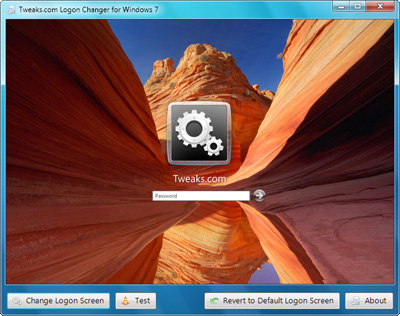

After you download and start the utility just click Change Logon Screen and then select your new background. 


The new background will be active as soon as you select the new background. Click Test to see it in action.

Make sure that the background you select is smaller than 256KB, otherwise it will be rejected because of a size limitation set by Microsoft.

If you want to remove your customized background just click Revert to Default Logon Screen and the registry changes will be removed.

Click here to visit the Tweaks.com Logon Changer Web page and download for free.

If you would like to manually tweak your logon screen by editing the registry and copying files visit Rafael's tutorial here.
 
Free Computer Magazines
eWeek, RCR Wireless, Information Week, Business Week, Many More Free Magazines!

 
Comments
ert
Thank You
319 days ago
Brad
mine always reverts back to normal when i reboot. I just installed the RC1 windows 7 and im wondering if that's it
267 days ago
Danil
Thank You
262 days ago
David
I love this simple and easy to use tool.Worked great to easily change my Windows 7 log-in screen from the boring blue screen provided by Microsoft.Thank you!
259 days ago
terminhell
took them long enough. still not very tweakable though...simple background change? Lame.
257 days ago
CarlosMC
What if you make it take settings the way wallpaper does - image rotation, position, base folder, etc.?
245 days ago
CarlosMC
Preserve image aspect ratio missing.
Thx for the app.
245 days ago
Thanks for the feedback everyone. I'm working to provide more image options in the next version.
244 days ago
bill
Great job on this one. I use it faithfully! And i've passed it along to many..
224 days ago
George
This is not good. I set it and when i shutdown the computer it uses the one i want. But upon reboot it uses 7's default again. WHY!
219 days ago
ABK
I'm from Russia, Moscow.......... Very nice programm!!! Best Regards to all..... +30 degr. C now in Moscow..........
207 days ago
eltercero
hey, great work. however i wanna know if you could also have the option to tweak the size of the logon user account picture. i would want to make it a little larger. thanks.
180 days ago
Lee
This little app is just the ticket for customization to the log on screen, thank you so much. Just a thought I had though, would it be possiable to add to this app and be able to use a differant picture for the log off screen as well? Really would be a great addition to a great app if you could do it ( at the going price of course )
In any case thanks so much for this app
170 days ago
Andreas
First I want to say thank you for this handy tool.
Second, I want to post a suggestion:
Why not have the least selected folder instead of the defaulty My Pictures folder in the open dialog?
151 days ago
PanicAcid
I'm having the same problem where it reverts back to normal when I reboot,

Any Ideas?
142 days ago
furman
Hey how about having a random option. Say you give it a folder and every time you boot up it chooses a different image out of the folder and uses it. To me that would be pretty awesome because then you would have a different one every time and it wouldn't be the same boring one over and over until you change it. That's all I have. Other than that it's a good program.
139 days ago
Craig
Thanks for a great app. Feature Request: It would be nice to add a button to Always use Custom Logon Background. Right now when you setup the new logon background, if you change themes it will go back to the default Windows 7 logon backgroup. Yes, by changing the setting in the reg or via a GPO this can be fixed but it would be nice just to have the option in the program. Thanks
129 days ago
Philip
Thank you for this tool - really nice and I'm thinking about customising our corporate OS image with an updated logon screen.

Do you know what resolution the image needs to be? Presumably Windows scales it but what is an ideal shape/size to start with?
118 days ago
Corie
This is great, thanks a lot!
118 days ago
Petter
where can i download can i get more themse
108 days ago
Yeh, great ap. Just need to fix why it doesn't stick. Always reverts back to default after reboot. Other than that, killer ap!!!
106 days ago
Bill
I continue to get an error saying that I don't have access
104 days ago
toy_doc
windows 7 logon screen changer program doesn't work reverts to default screen.
104 days ago
Nathan
i have an acer runnin windows 7 home premium but when i tweak it from the original backround it just goes to a green acer backround on the logon screen
103 days ago
For those of you having issues try clearing the contents of C:\Windows\System32\oobe\info\backgrounds before selecting a new background. There may be some OEM junk in there. If you need further support try posting in the forum here: http://tweaks.com/forum/Forum89-1.aspx
102 days ago
Angela
this is great. im oen of those people that get bore if the computer looks the same all the time. but it would be nice if this app look and actedd just a little like the one i used for windows xp and vista, on www.wincustomize.com. for those having trouble keeping the logon from changing on reboot, try turning off the windows background changer. that is how i got mine to stay the same.
99 days ago
Chriss
I prefer replacing the image in imageres.dll with an utility like Restorator 2007 because the size limitation imposed by Microsoft with this method is way too restrictive. I have some images with fine details and they became extremely ugly when I use this utility. And this just for my 1280 x 800 resolution, not to mention higher. Sadly that Microsoft imposed this, because not anyone can do like I do :(
85 days ago
Fifi 900
Thanks very good
83 days ago
Jayson
This worked for me the first time I ran the application, but after that I keep getting this:

TweaksLogon.exe - Fatal error CLR error: 80004005. The program will now terminate.

and then it shuts down the app and I cant use it again. I tried redownloading but that didnt work either. Wish I could use it more than once =/ it was nice to have the option while it lasted.
83 days ago
Hallo
Thank you for Change Logon Screen
63 days ago
Tom
I like this utility very much. Because of the aspect ratio problem already mentioned, you have to find just the right sort of picture to work well with it.

However, when using WindowBlinds by Stardock, I can't use TweakLogon, because the buttons on the bottom of the window aren't there. The work-around is to switch back, in WindowBlinds, to the standard Aero theme temporarily and then run TweakLogon to change the logon screen.

This would not be all that frustrating, except that if you ever change the theme under "Personalize", it changes the logon screen back to the default, thus requiring going through the work-around to get the logon screen changed back to what I want it to be.
63 days ago
tigerhorse28
THANKS! Mad props!
I'm running an Acer w/Win7 Premium and was disappointed it didn't work at first, but then I read your comment about the "C:\Windows\System32\oobe\info\backgrounds" folder. I went there and saw my new image and took all the yucky stock images and moved them to another folder, restarted my computer, and PRESTO! Thanks for the tip!

Now if only I could figure out how to bundle this application, or something similar, into the "personalized themes" section in Control Panel.
62 days ago
Jayson, sounds like something is broken with the .Net framework on your computer. Try downloading .Net framework 3.5 from Microsoft.com and reinstall it.
56 days ago
one1
Can you add a feature that will play mp4 (video) files? I have an animation set up that I was hoping to use but your program only accepts jpg files.

Thanks
one1
56 days ago
Eviltwin
Is there a way to remove the Windows branding at the bottom of the logon screen? I was hoping that this would remove it but unfortunately it didn't.

Thanks!!

Eviltwin
54 days ago
Ben
hey, the idea sounds great, but my laptop doesn't seem to let it work.

i have an acer aspire 5532? (if that's what it's called!) and it has its own custom logon screen. if i choose 'Default Login Screen' that works fine and goes to the windows 7 design, however when i choose my own picture to use, i test it and the 'acer' logon screen pops up instead.

any help would be greatly appreciated

cheers
41 days ago
duncan
when i go to open the program it doesnt open anyone know why this is?
thanks for any help
38 days ago
Humm... interesting,

I have always wondered how to do this inorder to brand the office computers,

Would this work on multiple operating systems... not all the computers are running 7,

Keep up the good work
35 days ago
Ross Anderson
Hello, I too had the problem above on my Acer/Win7 setup, namely: the changer prog worked but always reverted to the default Acer screen when I rebooted. Your suggestion "clearing the contents of C:\Windows\System32\oobe\info\backgrounds before selecting a new background." solved the problem. Now if only \I could change the boot screen.......
30 days ago
aaaaplay
Does anyone know where you can get the OEM acer windows 7 logon screen please someone help!!
21 days ago
 
Post a Comment

Name  

E-Mail  (Not Published)

URL