When you type in a domain name such as wingeek.com in your browser the computer must resolve the friendly name into an IP address of the server to download the web page and supporting files. Windows uses a DNS (domain name system) server to lookup this information.  By default, Windows uses your ISP’s DNS server.  Depending on your provider, the performance of their DNS resolving server varies.  Some large national providers are known to provide unreliable and slow DNS servers.  

The performance of the DNS server you are using is one component that affects the speed of your internet browsing.  Since each domain name you type in must be resolved into an IP address, the amount of time that takes will delay the loading of any web page.  Some users with overloaded ISP DNS servers can see delays in multiple seconds before web pages start to load.

OpenDNS provides free alternative DNS servers that anyone can use with any internet provider.  Unlike many national internet providers, OpenDNS’s DNS servers are very fast and reliable.   Using OpenDNS servers instead of your ISP servers will help you speed up your internet browsing by cutting down on the delay between resolving a domain name and getting the IP address so your browser can start loading the web page.

Configuring your computer to use OpenDNS servers instead of your ISP’s is a simple change that works in all versions of Windows:

  1. Click on the Start Button and type in ncpa.cpl and hit Enter.  In Windows XP Click on the Start Button, click Run and then type in ncpa.cpl. Make sure you run ncpa.cpl as administrator on Windows 8. 
  2. Right click on your active network connection that you use to connect to the Internet and select Properties.
  3. On the Networking / General tab, select Internet Protocol (TCP/IP) (version 4 on Windows Vista, 7 and 8) and hit Properties.
  4. On the properties screen, select Use the following DNS server addresses and then type in 208.67.222.222 in the preferred and 208.67.220.220 in the alternate boxes.
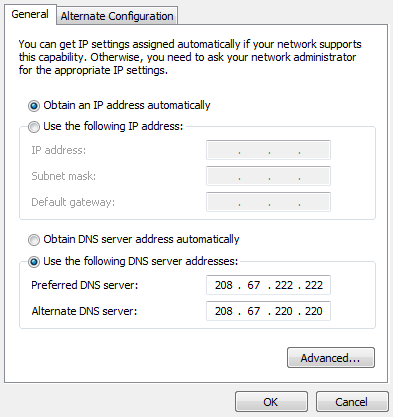
     
  5. Hit OK twice and you are finished.

Visit OpenDNS.com to learn more about some of the advanced features of OpenDNS on top of the speed benefits.
 
Free Computer Magazines and eBooks
 
Comments
Stefan
2 years ago
Very proper.
454
2 years ago
didn't work
jan .k
2 years ago
inpressive good job works 150% faster
James
2 years ago
improved loading of webpages by much as 2 seconds. (and i live in the caribbean, not sure if that counts.)
Benjamin
2 years ago
Very nice :)
One thing that should be mentioned though.
Do Not do this at work as world dns will not be able to resolve your internal ressources if they are on a seperate Subnet
TJ
2 years ago
i dont get dns errors anymore, my browsing is also so much faster!!!!
tRaCeR
2 years ago
It Works, Thanks!!
Ed
2 years ago
Works ! my ISP DNS server was sooooooo slow to resolve web pages , after doing the above pages load so much faster ......Thanks !
Willem
2 years ago
Wow that's so awesome it actually worked!!
tknking
2 years ago
this tweak is awosome ty and for the one that say it does not work either you did not do it right or u just dont need to utilize this tweak
Brendon
2 years ago
Nice tweak, works well :)
Kelly
2 years ago
This works really well, thanks Wingeek and OpenDNS!!
unknown
2 years ago
ppl..im usin a dial-up n its freakn sloow..! any way i kan spped up my connection n speeds..?
Jim
2 years ago
Works nice but seems to "freeze" certain logins.
randomataxia
2 years ago
or you can use 4.2.2.1 for the primary and 4.2.2.2 for the secondary.
Doug
2 years ago
Amazing, how come I never heard of this :O
MadMike
2 years ago
You guys are crazy. I'm on ADSL in New Zealand. Ping times to OpenDns DNS servers are 178ms and higher. Ping times to my ISP's DNS servers are 50ms and under.
Unless your ISP's DNS server is slower to respond than the OpenDNS ones, you will not see a difference.
If your ISP's DNS server ping time is over 100ms its probably time to find a decent ISP anyway.

frizz
2 years ago
great tip my browser is a ton faster now! Thanks a lot!
Steven
2 years ago
This true MadMike, however alot of these people are probably in the US. But totally agree if your ISP DNS server ping time is over 100ms its time to find a decent ISP.
chris
2 years ago
thanks windows 7 browsing seems a bit faster
Ryan
2 years ago
If it's not working for you, you may be behind a firewall whose policy does not allow DNS udp traffic.
rover3500
2 years ago
I've been using opendns for ages.It doesn't just speed ur browsing,it adds alot of security aswell.It has blocked 172 attacks and malware in the last month,which would have got to my computer.Lots of other benefits aswell.It is unlikely most isp dns does as much as well.
tdogg
2 years ago
It's seems to have worked. Should I enter this into my router too? Thanks.
matrix86
One year ago
Here's something people need to keep in mind. You can't just do one speed test and compare results. I did 6 tests (alternating each time between my ISP DNS and Open DNS), and after the comparison, they each came out about the same. ISP DNS pings were 55, 52, and 57. Open DNS pings were 56, 54, and 56. So basically, you need to do more than one ping test to get your actual results. That is unless your pings are very far apart...then I think your results will be quite obvious with only one test, lol.
Steve Sinchak
One year ago
matrix86 and others: I think it is important to measure DNS performance not only with PING response time but with the actual DNS resolution time. I used that data in my comparison of Google DNS to OpenDNS and Comcast DNS located here: http://wingeek.com/articles/40447/google-public-dns-makes-the-web-slower/
dave
One year ago
Great article. It may also be necessary to allow outgoing snmp on your firewall, as Windows internal DNS apparently queries it periodically for information. Anyone know more about this?

dave
jpsycho
One year ago
use this .. its more faster
http://code.google.com/p/namebench/
Ahmad
One year ago
I live in Pakistan and here Google Public DNS is awesome but I am using ZTE Router, which is annoying and does not allow me to change DNS Server easily.
nevil
One year ago
Meh..

the time spent reading this article would exceed the cumulative time savings one can ever hope to achieve from this tweak.
Jay Dee
One year ago
Jay Dee
Definately worked. I hope for good. Thanks.
Arik
One year ago
tx for this trick
it works :)
Shreyas
One year ago
thanks very much iam usin mobile net but now late night it works as brodband
влад
One year ago
Погано робит.
Athlonite
One year ago
I agree with MadMike as I also live in NZ but I use OpenDNS anyways because it offers far more security than my far faster ISP's one does :) and I've used it for the last 4yrs
Mark Henry Salvador
360 days ago
This is really a big boost since most ISP have very slow DNS. With Comcast there is a millisecond boost but its worth it sometimes. Its quite annoying when you want it to google instead it goes straight to OPENDNS search.

I approve this tweak to work and boost your web browsing
Astyanax
250 days ago
This tweak did absolutely nothing to make my web browsing faster.
Nicholas178
208 days ago
holy crap its fast
Valentino Vigilante
192 days ago
omg. thank you soooooo much. this is amazing.