If your computer has some RAM to spare, RAM drives are perfect for increasing the performance of any application that must read and write a lot of data. Using a special kernel mode driver along with system memory, a temporary RAM drive can be created that is significantly faster than traditional storage. Spindle based hard drives found in almost every computer have a maximum read and write speed of around 100 MB per second. The performances of RAM drives are only limited by the speed of the memory and chipset. That results in read and writes speeds well above 1 GB per second and on high end systems much faster.
There are a lot of different ways to create a RAM drive. The method that I’m going to show you will use a free utility called RAMDisk that will allow you to create a RAM drive up to 4GB (assuming you have more than 4GB of RAM in your PC).
First, download and install the latest version of Dataram RAMDisk.
Then click on the Start Button and launch the RAMDisk Configuration Utility

On the Settings tab specify the Disk Size and the partition type.
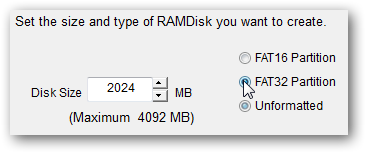
Then click Start RAMDisk and your drive will be ready for use in Windows Explorer listed next to the other storage devices on your computer.
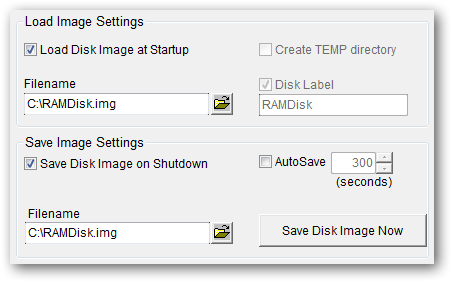
The main problem with RAM drives is the non-persistent nature of the disk. Turn off your computer and the contents of the RAM drive will be gone forever. The Dataram RAMDisk utility has a helpful feature that will allow you to save the state of your RAM drive upon shutting down and loading an image of it, from a file on your hard drive, on startup to restore any data. You can find these settings on the Load and Save tab of the RAMDisk Configuration Utility.
Now that you have your RAM drive setup and running try moving the Internet Explorer Temporary Internet files to speed up web browsing or redirect any other disk intensive application to use the RAM drive.